
EC2 Basics
Amazon Elastic Compute Cloud (Amazon EC2) provides scalable computing capacity in the AWS Cloud. It eliminates the need to invest in hardware up front, so you can develop and deploy applications faster.

- AMI (Amazon Machine Image):
- A template that contains the software configuration (OS, application server, and applications) required to launch your instance.
- Region Scoped: AMIs are locked to a specific region. To use an AMI in another region, you must copy it.
- Public vs. Private: You can create your own AMIs and choose to keep them private or share them publicly.
- User Data:
- Script used to run commands when an instance first launches.
- Used to bootstrap instances (e.g., install updates, install software, download files from S3).
- Runs with
rootprivileges.
- Instance Metadata:
- Data about your instance (e.g., private IP, public IP, hostname, IAM role name).
- Accessible from within the instance via URL:
http://169.254.169.254/latest/meta-data/Important (Exam Tip)
Do not confuse User Data (boot script) with Metadata (instance info).
EC2 Instance Type Basics
Understanding instance families is crucial for selecting the right resource for a workload.
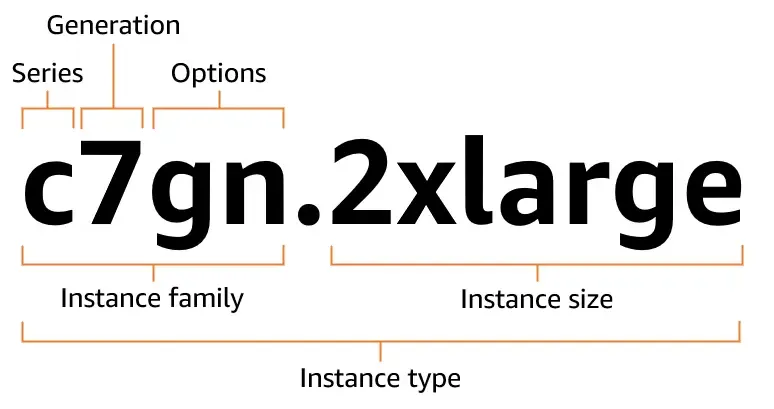
Amazon EC2 instance type naming conventions
Naming convention: e.g., m5.2xlarge
m: Instance Class (Family)
5: Generation (Higher is newer)
2xlarge: Size (CPU/RAM capacity)
Key Instance Families (Mnemonic: “FIGHT DR MC. P.X.”)
| Family Code | Type | Use Case |
|---|---|---|
| G, P, Tr, Inf | Accelerated Computing | Graphics, Graphics Processing, Floating Point Number calculations, Machine Learning, AI |
| I, D, H | Storage Optimized | High IOPS, Data Warehousing, Distributed File Systems. I instances are great for databases needing high I/O (NoSQL) |
| M | General Purpose | Balanced Compute/Memory/Networking. Good for application servers, gaming servers, small DBs. |
| C | Compute Optimized | High performance processors. Batch processing, media transcoding, scientific modeling, dedicated gaming servers. |
| R, X, Z | Memory Optimized | High RAM. In memory databases (Redis, Memcached), Real-time processing of big data (Apache Spark). |
| T | Burstable | General purpose but with the ability to “burst” CPU. Uses CPU credits. Good for workloads with idle time (e.g., dev environments) |
Important (Exam Tip)
If the scenario mentions “High Performance Computing (HPC)” or “Batch Processing”, think C family.
If it mentions “In-memory database” or “Cache”, think R family.
Security Group & Classic Ports Overview
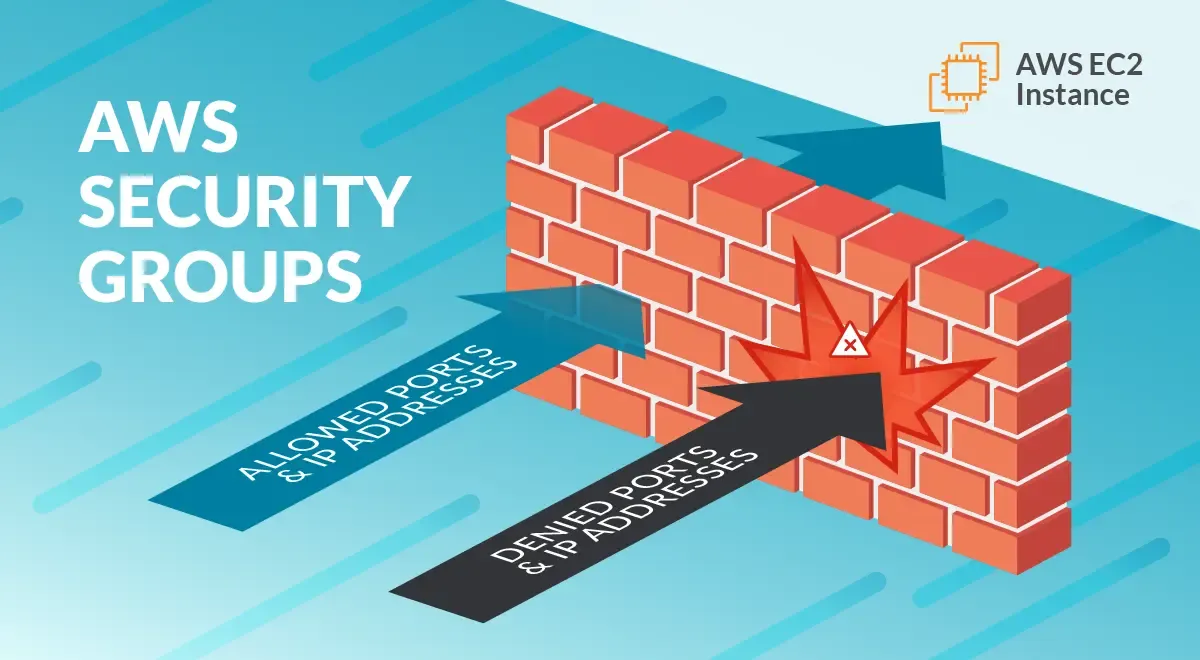
A Security Group acts as a virtual firewall for your EC2 instances to control incoming and outgoing traffic.
| Scope | Acting at the Instance level, not the subnet level |
| Stateful | If you allow traffic IN, the response traffic is automatically OUT (and vice versa) |
| Rules | Can only ALLOW rules (cannot create DENY rules) Implicitly DENIES ALL inbound traffic by default Allows ALL OUTBOUND traffic by default |
| Referencing | You can authorize a specific Security Group ID instead of a CIDR block. This is the best practice for multi tier apps (e.g., Allow DB SG to accept traffic only from WebApp SG) |
Common Ports to Know
| Port | Protocol | Service |
|---|---|---|
| 22 | SSH | Linux login (Secure Shell) |
| 3389 | RDP | Windows login (Remote Desktop) |
| 80 | HTTP | Unsecured web traffic |
| 443 | HTTPS | Secured web traffic |
| 21 | FTP | File transfer |
| 3306 | TCP | MySQL / Aurora / MariaDB |
| 5432 | TCP | PostgreSQL |
Important (Exam Tip)
If you cannot connect to your instance and the connection times out, it is almost always a Security Group issue.
If you get a “Connection Refused” error, the Security Group is likely fine, but the application on the instance isn’t running.
SSH Overview
SSH (Secure Shell) is used to command a Linux instance remotely.
- Key Pairs: AWS uses public key cryptography.
- Public Key: Stored by AWS on the EC2 instance.
- Private Key: Stored by you (the
.pemfile). If you lose this, you cannot recover it.
- PuTTY (Windows < 10): Requires converting
.pemto.ppkusing PuTTYgen. - chmod 400: On Mac/Linux, you must secure your key file permissions before connecting:
Terminal window chmod 400 my-key-pair.pem - EC2 Instance Connect: A browser based SSH connection that works without managing key files manually (uses IAM permissions).
EC2 Instance Purchasing Options
Choosing the right pricing model is a common cost optimization question on the exam.
| Option | Description | Best For |
|---|---|---|
| On-Demand | Pay by the second (Linux/Windows) or hour. No commitment, highest cost. | Short term, spiky, or unpredictable workloads. First time apps. |
| Reserved (Standard) | 1 or 3 year commitment. Up to 72% discount. Can modify AZ, scope, and networking type. | Steady state usage (e.g., core database). |
| Reserved (Convertible) | 1 or 3 year commitment. Up to 54% discount. Can change instance family, OS, tenancy, and payment option. | Steady state usage where software needs might change. |
| Savings Plans | Commitment to a specific usage (e.g., $10/hour) for 1 or 3 years. EC2 Instance Savings Plan (locked family/region) or Compute Savings Plan (flexible across EC2, Fargate, Lambda). | Most flexible long term option. Compute Savings Plans are the usual answer when a question wants flexibility and cost savings. |
| Spot Instances | Use spare capacity. Up to 90% discount. Can be interrupted with a 2 minute notice. | Stateless, fault tolerant, flexible workloads (batch jobs, image processing, CI/CD). |
| Dedicated Host | A physical server fully dedicated to your use. Gives visibility into sockets/cores. | Compliance requirements and BYOL (Bring Your Own License) that charge per socket/core. |
| Dedicated Instance | Instances run on hardware dedicated to you (single tenant), but you don’t control placement. | Compliance needs requiring single tenancy but not specific hardware control. |
| Capacity Reservation | Reserves capacity in a specific AZ. No billing discount — charged the On-Demand rate whether you run it or not. | Guaranteeing you can launch in a specific AZ during a critical event (e.g., Black Friday). |
Important (Exam Tip)
Dedicated Host vs Dedicated Instance: pick Host when the question mentions per socket/per core licensing or needing visibility into the underlying hardware. Otherwise Dedicated Instance is enough.
Spot Instances & Spot Fleet
Spot Instances are the cheapest option but come with the risk of termination.
- Spot Price: Market price that changes based on supply/demand. You define a max price.
- Interruption: If the Spot Price rises above your max price, or AWS needs the capacity back, you get a 2 minute warning.
- Spot Request Types:
- One-time: If interrupted, the request is closed.
- Persistent: If interrupted, the request reopens and tries to launch a new instance once capacity is available.
Spot Fleet
A collection of Spot Instances and (optionally) On-Demand Instances. It attempts to meet a target capacity (e.g., 50 vCPUs) using a mix of instance types.
| Strategy | Behaviour | Trade-off |
|---|---|---|
lowestPrice | Launches from the pool with the lowest price. | Best cost optimization, but the highest interruption risk. |
diversified | Distributes instances across all pools. | High availability, lower interruption risk. |
capacityOptimized | Launches from the pools with optimal capacity for the number of instances. | Best for minimizing interruptions. Exam favourite. |
Important (Exam Tip)
If a question asks for “cost optimization” on a critical workload or a database, never choose Spot Instances. Spot is only for interruptible workloads.